The Digital Balance: Screen Time Rules That Help You Learn More (Not Less)
 Manoj Ganapathi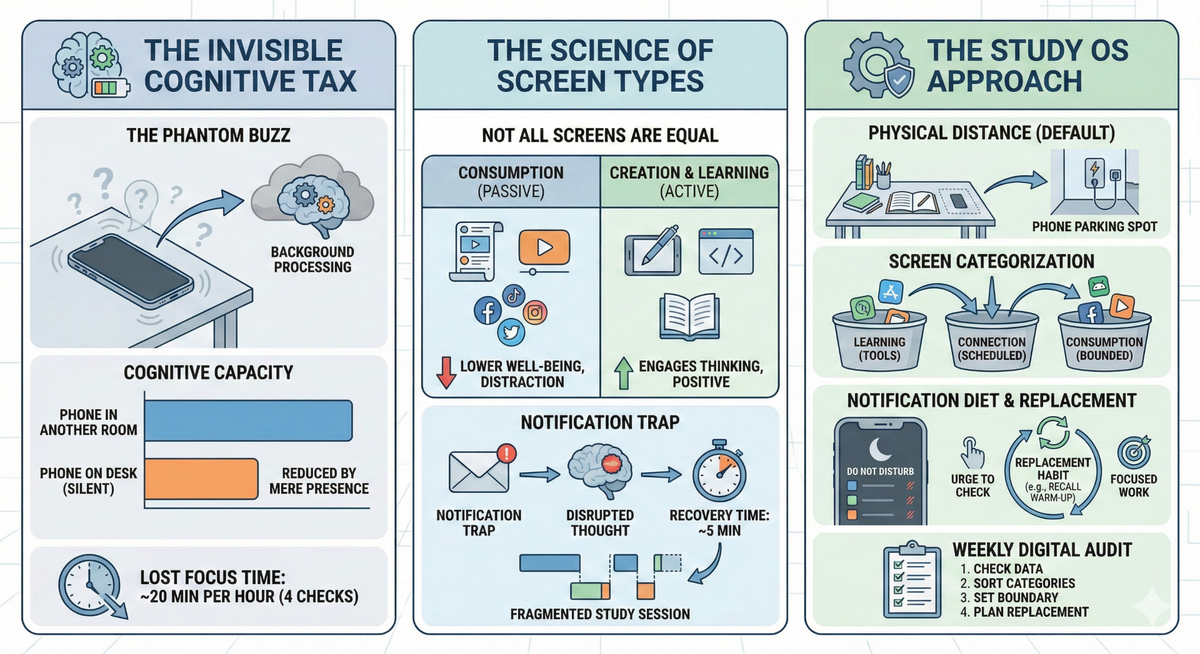
Why your phone is stealing your focus even when you haven't touched it — and why "just put it away" isn't enough.
Here's something wild: your phone doesn't have to ring, buzz, or light up to steal your brainpower. It doesn't even have to be turned on.
In 2017, researchers at the University of Texas asked nearly 800 people to complete cognitive tests. Some placed their phones face-down on the desk. Some put them in a pocket or bag. Some left them in another room entirely. The results were striking: people whose phones were in another room significantly outperformed those whose phones were on the desk — even though nobody checked their phone during the test.
Your phone's mere presence occupies part of your brain. Not because you're weak. Not because you're addicted. Because your brain is constantly spending cognitive resources to not think about it.
This is the invisible tax that nobody warned you about. And for students trying to study in a world designed to pull their attention toward screens, that tax adds up fast.
EaseFactor treats digital wellness as a focus skill — part of your Study OS — not a moral judgment about screen time.
The named pattern: The Phantom Buzz
The Phantom Buzz: The invisible drain on your thinking that happens when your phone is nearby — even silent, even face-down, even off. Your brain knows it's there, knows it could deliver something interesting at any moment, and spends background processing power monitoring that possibility. Like a phantom vibration you feel even when nothing happened, The Phantom Buzz is your brain allocating attention to your phone without your permission.
Here's what The Phantom Buzz looks like in real life:
- You sit down to study math at 4:00 PM. Phone is on the desk, face-down, silent.
- First 3 minutes: reading the problem, working through steps
- Minute 4: a fleeting thought — "Did anyone reply to my message?" — you dismiss it, return to the problem
- Minute 6: you glance at the phone without realizing it. Nothing happened. Back to math.
- Minute 9: you're stuck on a problem and your hand drifts toward the phone. You stop yourself.
- Minute 11: you pick it up "just to check the time" — but there's a notification. Quick look... 3 minutes later you're watching a video.
- Minute 18: guilt. Back to math. But now you've lost your place and your momentum.
Here's the part that matters: even in minutes 1-9, when the student never touched the phone, their brain was working harder than it needed to. The phone was running a background process — like an app draining battery even when you're not using it. That's The Phantom Buzz: not a distraction you chose, but a tax your brain paid automatically.
Quick diagnosis: why "just put it down" isn't enough
Symptoms students show:
- "I can't study without checking my phone every few minutes"
- "I lose track of time on social media when I should be studying"
- "I meant to look something up and ended up scrolling for 30 minutes"
- "I feel anxious when I can't see my phone"
- "I check my phone even when I know nothing new is there"
What's actually missing:
Not willpower. Not discipline. Digital infrastructure. Students are told to "use less screen time" without understanding why screens capture attention or which screen time actually hurts learning.
| Symptom | What's actually happening | What helps |
|---|---|---|
| Constant phone checking | Brain seeking dopamine micro-hits from novelty | Physical separation (not just face-down—out of the room) |
| "Just 5 minutes" turning into 30 | App design exploits variable reward schedules | Remove apps from home screen; use app timers |
| Anxiety when phone is away | Habituated dependence on connectivity | Graduated separation practice (start with 10 min) |
| Can't study without background video | Silence feels uncomfortable; brain seeks stimulation | Replace with lo-fi music or nature sounds (no lyrics, no visuals) |
| Doom-scrolling before bed | Blue light + emotional content disrupts sleep onset | Phone charges in another room; screen curfew 30 min before bed |
More rules won't fix a system designed to exploit your attention. You need to understand the design — and build counter-systems.
The science: how screens hijack your study brain
1. The Brain Drain Effect (Ward, Duke, Gneezy & Bos)
Adrian Ward and colleagues at the University of Texas published one of the most striking findings in attention research: your phone's mere presence reduces your available cognitive capacity.
In their experiments, participants were randomly assigned to place their phones on the desk, in a pocket/bag, or in another room. All phones were silent. Nobody checked them. Yet performance on cognitive tasks followed a clear pattern:
| Phone location | Cognitive performance |
|---|---|
| On the desk | Lowest scores |
| In pocket/bag | Middle scores |
| In another room | Highest scores |
The researchers concluded that the process of actively suppressing the urge to check your phone — even unconsciously — consumes cognitive resources that could otherwise go to thinking, problem-solving, and learning.
What this means for studying: Face-down isn't far enough. Silent mode isn't quiet enough. Your phone needs to be physically elsewhere when you need to think deeply.
2. Not all screen time is equal
Jean Twenge, professor of psychology at San Diego State University, has studied the effects of screen time on over 40,000 adolescents. Her research reveals an important nuance that "screen time" debates often miss:
The type of screen activity matters more than the total hours.
| Screen activity type | Effect on well-being and learning |
|---|---|
| Passive consumption (scrolling feeds, watching without purpose) | Negative — associated with lower well-being, more distraction |
| Social comparison (Instagram, TikTok highlights) | Most negative — linked to anxiety, depression, reduced self-efficacy |
| Active creation (writing, coding, making videos) | Neutral to positive — engages higher-order thinking |
| Educational use (research, learning apps, study tools) | Positive — especially with retrieval practice built in |
| Social connection (video calls with friends, collaborative work) | Positive — supports belonging and cooperation |
This means a blanket "reduce screen time" rule misses the point. A student spending 2 hours building a presentation is doing something fundamentally different from a student spending 2 hours scrolling TikTok — even though both register as "2 hours of screen time."
3. The notification trap (Rosen)
Larry Rosen, professor of psychology at California State University, has studied over 30,000 children, teens, and adults across 24 countries. His research reveals the cost of notifications:
- The average student checks their phone every 15 minutes throughout the day
- Each check takes about 5 minutes to fully recover from (attention doesn't snap back instantly)
- Students who received text messages during a learning task scored significantly lower on immediate tests
- Even a single notification — without responding to it — disrupts the continuity of focused thought
The math is devastating: if you check your phone 4 times during a 1-hour study session, and each check costs 5 minutes of recovery time, you've lost 20 minutes of deep thinking in a 60-minute session. That's not "a little distraction." That's a third of your study time vanishing.
4. Digital Minimalism: intention beats abstinence (Newport)
Cal Newport, professor of computer science at Georgetown University, argues that the solution isn't to eliminate technology — it's to use it intentionally. His Digital Minimalism framework proposes:
- Technology is a tool, not a lifestyle. You decide when and how to use it.
- Default to off. Notifications, apps, and feeds should earn your attention, not demand it.
- Reclaim leisure. Replace low-quality digital habits with high-quality analog activities.
Newport's insight for students: you don't need to throw away your phone or delete all your apps. You need to decide in advance what your phone is for during study time (timer, calculator, specific research) and what it's not for (everything else). Intentional use beats abstinence because it's sustainable — and it puts you in control instead of the algorithm.
The Study OS approach: managing tech like a system, not a battle
A Study OS doesn't declare war on screens. It builds a digital environment that supports focus instead of fighting it.
1. Create physical distance (not just visual distance)
- Study mode default: Phone charges in another room during study blocks. Not face-down on the desk. Not in your pocket. In. Another. Room.
- If you need your phone for study tools (timer, calculator, specific app): put it in airplane mode first, open only the app you need, and place it face-down when not actively using it.
- The "phone parking spot": designate a specific place outside your study area where your phone lives during focus time. Same spot every time — build the habit.
2. Sort your screen time into categories
Not all screen time is equal, so stop treating it like one thing. Use these three categories:
| Category | Examples | Rule |
|---|---|---|
| Learning screens | Study apps, research, educational videos with notes | Encouraged — these are tools |
| Connection screens | Texting friends, video calls, group chats | Scheduled — set specific times, not constant checking |
| Consumption screens | Social media scrolling, random YouTube, doom-scrolling | Bounded — set time limits, never during study blocks |
When you separate these, "reduce screen time" becomes "reduce consumption screens and schedule connection screens." Much more actionable.
3. Build a notification diet
- Turn off all non-essential notifications. Keep calls and texts from family. Everything else — social media, games, news — gets silenced permanently (not just during study time).
- Batch your checking. Instead of checking your phone whenever the urge hits, check at scheduled times: after school, after study block, after dinner. Three checks instead of thirty.
- Use "Do Not Disturb" with favorites. Most phones let you silence everything except calls from starred contacts. Parents can still reach you; TikTok can wait.
4. Replace, don't just remove
Telling your brain "don't scroll" without offering an alternative creates a void your brain will fill with... scrolling. Instead:
- Before study: replace phone-scrolling with a 2-minute recall warm-up (alerting network activation from the Attention and Focus post)
- During breaks: replace phone-checking with nature exposure (step outside for 3 minutes — attention restoration)
- Before bed: replace doom-scrolling with a 5-minute review of tomorrow's plan
5. Track your digital receipts
Just like tracking study progress, track your digital habits. Once a week:
- Check your phone's built-in screen time data
- Sort it into the three categories (learning, connection, consumption)
- Ask: "Did my consumption time steal from my study time this week?"
- Set one small boundary for next week
A concrete Tuesday example (what this looks like in real life)
Grade 7 Math (Fractions and Decimals), Tuesday 4:00 PM (12 minutes)
Goal: Study fraction-to-decimal conversions with digital infrastructure in place.
- 1 minute — Phone parking
Walk phone to the kitchen counter (the designated parking spot). Set a 12-minute timer before putting it down. Turn on Do Not Disturb.
Output: Phone physically separated. Timer running. - 2 minutes — Alerting warm-up (analog)
Sit at study spot with notebook. Write 3 fraction-to-decimal conversions from memory (don't check notes). Example: 1/4 = 0.25, 1/3 = 0.333..., 3/8 = ?
Output: 3 recall attempts without any screen. - 7 minutes — Focused practice block
Work through 5 practice problems from the worksheet. No screen needed — just pencil, paper, and the textbook. When the urge to check the phone appears, notice it: "That's The Phantom Buzz. My phone is in the kitchen. Back to fractions."
Output: 5 problems attempted with work shown. - 2 minutes — Recovery receipt (still no phone)
Stand up, look out the window for 30 seconds. Then write:
- "I got through ___ problems without checking my phone"
- "Hardest moment: minute ___ when I wanted to check [what]"
- "Tomorrow's parking spot: same kitchen counter"
Walk to kitchen. Check phone. Respond to anything important.
Output: 1 focus receipt + 1 digital awareness note.
Total: 12 minutes. Phone parked for all 12. Zero cognitive tax from The Phantom Buzz.
Try this today (10 minutes): The Digital Audit
Total time: 10 minutes (do this once per week)
Output: Screen time breakdown + 1 category sort + 1 boundary set + 1 replacement planned
This routine builds digital awareness — the metacognition layer of your digital life. You can't fix what you can't see.
Step 1: Check your numbers (2 min)
Open your phone's built-in screen time tracker (Settings > Screen Time on iPhone, Settings > Digital Wellbeing on Android). Write down:
- Total screen time today (or yesterday if doing this in the morning)
- Top 3 apps by time
- Number of pickups/unlocks
Don't judge. Just observe. Data, not drama.
Step 2: Sort into categories (3 min)
Take your top 3 apps and sort them:
| App | Category (Learning / Connection / Consumption) | Time spent |
|---|---|---|
| ___ | ___ | ___ min |
| ___ | ___ | ___ min |
| ___ | ___ | ___ min |
Now calculate your ratio. Example: "I spent 15 minutes on learning screens and 90 minutes on consumption screens." No shame — just awareness.
Step 3: Set one boundary (3 min)
Pick the one consumption app that ate the most time. Set ONE boundary for the coming week:
- "I'll set a 30-minute daily limit on [app]"
- "I'll move [app] off my home screen"
- "I'll only open [app] after my study block is done"
- "I'll charge my phone in the kitchen during homework"
Write it down. Small and specific beats ambitious and vague.
Step 4: Plan one replacement (2 min)
For the time you're reclaiming, choose one analog replacement:
- "Instead of scrolling before studying, I'll do a 2-minute recall warm-up"
- "Instead of checking my phone during study breaks, I'll look outside for 3 minutes"
- "Instead of doom-scrolling before bed, I'll write tomorrow's study plan"
Write your replacement next to your boundary. Review both next week.
De-shaming reframe: Checking your screen time data isn't about feeling guilty. It's about understanding where your attention goes — the same way tracking your study time helps you see what you actually accomplished. You wouldn't feel bad about checking your grade on a test. This is the same thing: data that helps you adjust. No judgment. Just information.
For parents: how to support digital balance without starting a tech war
- Don't confiscate — collaborate. Taking away the phone creates power struggles and teaches nothing about self-regulation. Instead, work together: "Where should your phone park during study time? Let's pick a spot." This builds autonomy and shared ownership.
- Model what you're asking for. If you tell your child to put their phone away while you scroll through yours, the message is "Do as I say, not as I do." During family study or homework time, park your phone too. Kids learn digital habits by watching adults manage theirs.
- Sort screen time together. Help your child do the Digital Audit. Don't focus on total hours — focus on categories. "You spent 45 minutes on a coding app and 45 minutes on TikTok. Those are very different kinds of screen time. What do you notice?"
- Set boundaries, not bans. Research consistently shows that intentional use beats total abstinence. Help your child create specific, sustainable rules: "Phone charges in the kitchen during homework" is better than "No phone until you're done."
- Normalize the struggle. Adults check their phones every 15 minutes too. Saying "I noticed I was scrolling instead of doing my work email, so I moved my phone to the other room" teaches your child that The Phantom Buzz affects everyone — and that everyone can build systems to manage it.
Calm next step: make tech work for your learning, not against it
You don't need to throw your phone in a river. You don't need to "detox" from all technology. You need a system that puts you in control of when and how you use screens — so technology serves your learning instead of stealing from it.
EaseFactor's Study OS builds digital balance into every study session:
- Phone parking that eliminates The Phantom Buzz before it starts
- Screen time sorting that separates helpful tech from attention-draining tech
- Notification diets that protect focus blocks from interruption
- Digital Audits that make your screen habits visible and adjustable
- Replacement habits that fill the gap with high-quality alternatives
Screens aren't the enemy. Unintentional screen use is. A Study OS helps you choose your screens — instead of letting your screens choose you.
TL;DR
- Your phone drains cognitive capacity just by being nearby — even silent, even face-down. The Phantom Buzz is your brain spending background resources monitoring your phone without your permission.
- Not all screen time is equal — sort yours into learning, connection, and consumption. Reducing consumption screens and scheduling connection screens is more effective (and sustainable) than blanket "less screen time" rules.
- Start today: Try the 10-minute Digital Audit — check your screen time data, sort your top apps into categories, set one small boundary, and plan one analog replacement.
Citations
- Ward, A. F., Duke, K., Gneezy, A. & Bos, M. W. (2017): "Brain Drain: The Mere Presence of One's Own Smartphone Reduces Available Cognitive Capacity" — demonstrated that phone proximity alone reduces cognitive performance, even when the phone is silent and face-down
- Twenge, J. M. (2017): iGen: Why Today's Super-Connected Kids Are Growing Up Less Rebellious, More Tolerant, Less Happy—and Completely Unprepared for Adulthood — large-scale research on how smartphone-era technology has reshaped adolescent well-being, focus, and social development
- Twenge, J. M., Martin, G. N. & Campbell, W. K. (2018): "Associations between screen time and lower psychological well-being among children and adolescents" — found that after 1 hour per day, more screen time is associated with lower self-control, more distractibility, and less emotional stability
- Newport, C. (2019): Digital Minimalism: Choosing a Focused Life in a Noisy World — proposed intentional technology use as a sustainable alternative to abstinence, arguing that defaults should favor focused engagement
- Newport, C. (2016): Deep Work: Rules for Focused Success in a Distracted World — established that uninterrupted focus is increasingly rare and disproportionately valuable, and that environmental design supports it better than willpower
- Rosen, L. D. (2017): "The Distracted Student Mind — Enhancing Its Focus and Attention" — found students check phones every 15 minutes, with each interruption requiring significant recovery time for sustained attention
- Rosen, L. D. (2012): iDisorder: Understanding Our Obsession with Technology and Overcoming Its Hold on Us — documented how habitual technology use produces anxiety-like symptoms when devices are unavailable
- Przybylski, A. K. & Weinstein, N. (2017): "A Large-Scale Test of the Goldilocks Hypothesis: Quantifying the Relations Between Digital-Screen Use and the Mental Well-Being of Adolescents" — found a curvilinear relationship where moderate screen use is not harmful, but excessive use is associated with lower well-being

Manoj Ganapathi
Founder and Builder of EaseFactor. Passionate about evidence-based learning and helping students build effective study habits through cognitive science principles.
Ready to Study Smarter?
EaseFactor uses these learning science principles to help you build lasting knowledge.