How to Learn from Videos Without Zoning Out: Strategies for Active Video Watching
 Manoj Ganapathi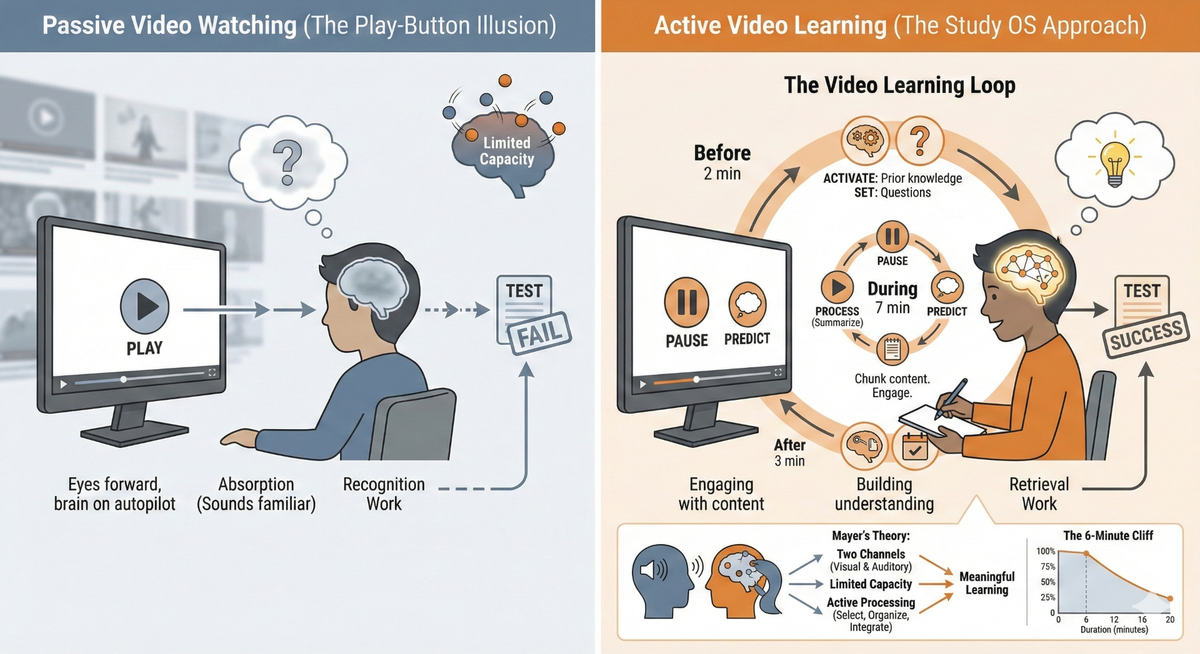
Why your eyes watched the whole video but your brain checked out somewhere around minute three.
You watched the entire lecture video. You even paused it a few times. So why does the test feel like you're seeing this material for the first time?
Most students don't struggle with video learning because videos are bad. They struggle because they've been taught to watch videos instead of learn from them. Pressing play creates the comforting illusion of studying without the actual work of building understanding.
Video is everywhere in education now. Khan Academy, YouTube tutorials, recorded lectures, TikTok explainers. Yet most students use the same passive strategy for educational videos that they use for Netflix: eyes forward, brain on autopilot.
EaseFactor exists to turn effort into advantage by combining learning science, AI, and disciplined practice, so students build understanding from video content that actually shows up on test day.
The named pattern: The Play-Button Illusion
The Play-Button Illusion: Watching educational videos from start to finish without actively processing the content, creating the feeling of productive studying while the brain remains in passive entertainment mode.
The play button makes you feel like you're being educated. The video plays, the expert explains, and information washes over you. But watching is recognition work, not retrieval work. You're absorbing "this sounds familiar" without forcing your brain to answer "what does this actually mean and how would I use it?"
The result: video content that felt crystal clear during watching becomes crystal foggy during testing.
Quick diagnosis: symptoms vs infrastructure
Symptoms you may notice:
- "I watched the whole video but can't explain what it was about."
- "It made perfect sense when I was watching, but I can't recreate it."
- "I have to rewatch the same video multiple times before anything sticks."
- "I zone out halfway through even when I'm trying to pay attention."
What's missing:
- A way to interact with video content while watching (not after)
- A way to check understanding before moving to the next section
- A structure that forces active processing instead of passive consumption
More videos, longer study sessions, and better headphones can help, but they work best when paired with a video learning system. A Study OS makes comprehension reliable, not accidental.
The science: why passive watching fails
Richard Mayer's Cognitive Theory of Multimedia Learning: two channels, limited capacity
Psychologist Richard Mayer has spent decades researching how people learn from words and pictures together. His key insight: we have two separate channels for processing multimedia, and both have limited capacity.
| Channel | What it processes | Capacity limit |
|---|---|---|
| Visual/Pictorial | Images, diagrams, animations, on-screen text | Limited working memory |
| Auditory/Verbal | Narration, spoken explanations | Limited working memory |
When a video throws too much at both channels simultaneously, cognitive overload happens. Your brain starts dropping information like a juggler with too many balls. This explains why elaborate, fast-paced videos can actually teach less than simpler ones.
According to Mayer, meaningful learning requires three cognitive processes: selecting (paying attention to relevant information), organizing (building mental structures), and integrating (connecting new information to what you already know). Passive watching skips all three.
The Six-Minute Cliff: why attention plummets with video length
Research examining student viewing of online course videos found something striking: videos under 6 minutes long had nearly 100% engagement, but engagement dropped dramatically after that.
| Video length | Median engagement time |
|---|---|
| Less than 6 minutes | Close to 100% (watched whole video) |
| 9-12 minutes | ~50% engagement drop |
| 12-40 minutes | Engagement falls below 20% |
This isn't about student laziness. It's about how working memory works. Sustained passive attention is exhausting, and without active engagement strategies, the brain naturally disengages to conserve resources.
Mayer's Principles: what makes videos work (or fail)
Mayer identified specific principles that determine whether multimedia helps or hurts learning:
| Principle | What it means | Why it matters for students |
|---|---|---|
| Segmenting | Learning improves when content is broken into learner-controlled chunks | You need to pause and process, not just watch straight through |
| Signaling | Highlighting key ideas helps guide attention | Without cues, you won't know what's important |
| Pre-training | Learning key concepts first helps process new information | You need background before the video, not just during |
| Coherence | Removing irrelevant content improves learning | Flashy extras hurt more than they help |
| Personalization | Conversational style beats formal language | Narrators who talk to you (not at you) improve engagement |
The critical insight: these principles describe what video creators should do. But as a student, you can apply them yourself by how you watch.
The Study OS approach: turning watching into learning
Here's the mental model to keep in mind:
Watching a video without processing is like attending a lecture while asleep. You were present. You spent the time. But you didn't actually learn anything.
A Study OS transforms video watching from a passive experience into an active training session. Instead of hoping understanding happens, you build systems that guarantee it.
Why passive watching fails (and what to do instead)
| Passive habit | Study OS habit | Why it matters |
|---|---|---|
| Watch straight through | Pause every 3-5 minutes to summarize | Forces processing, not just absorbing |
| Let video play while multitasking | Remove phone, close tabs, single-task | Divided attention destroys learning |
| Rewatch confusing parts immediately | Write down "what confuses me" first, then rewatch | Converts confusion to specific questions |
| Watch once and call it done | Write 3 questions you could now answer | Creates retrieval practice, proves comprehension |
The three-level video check
After watching any section, check which level you've reached:
- Can I recognize it? (If someone plays the video, does it sound familiar?) - This is NOT enough
- Can I explain it? (Can I state the main idea without the video playing?) - Getting closer
- Can I use it? (Can I answer a question, solve a problem, or teach someone else?) - THIS is learning
If you can only recognize but not explain, you're stuck in the Play-Button Illusion.
The Pause-Predict-Process cycle
The most powerful active watching technique is simple: stop the video before key explanations and predict what's coming.
- Pause before the teacher solves a problem or explains a concept
- Predict what you think the answer or explanation will be
- Play to see if you were right
- Process the gap between your prediction and the actual answer
This forces your brain to engage actively. Wrong predictions are especially valuable, they create the "desirable difficulty" that strengthens learning.
A concrete Tuesday example (what this looks like in real life)
Grade 7 Science (The Water Cycle), Tuesday 4:00pm (12 minutes)
Goal: Actually understand a 6-minute video on evaporation and condensation
- 1 minute - Pre-training setup
Before pressing play: write down what you already know about evaporation.
Output: 2-3 facts or guesses about the topic.
- 6 minutes - Active watching with pauses
Watch in 2-minute chunks. After each chunk:
- Pause the video
- Write one sentence: "This section was about ____"
- If anything confused you, write a "?" next to it
Output: 3 summary sentences, confusion spots marked.
- 3 minutes - Retrieval without the video
Close the video. Without looking:
- What are the steps of the water cycle mentioned?
- What causes evaporation to happen?
- What's the difference between evaporation and condensation?
Output: 3 answers attempted from memory.
- 2 minutes - Targeted rewatch + schedule
Go back ONLY to the parts you couldn't answer. Rewatch just those 30-60 seconds.
Put a 5-minute review on Thursday: "Can I still explain the water cycle steps?"
Output: Gaps filled + 1 scheduled review.
Total time: 12 minutes. But this 12 minutes builds genuine understanding. The old way (watch passively for 12 minutes) only builds familiarity that fades.
Try this today (12 minutes): The Video Learning Loop
Total time: 12 minutes
Output: 3 predictions made, 3 summary sentences, 3 retrieval attempts, next review scheduled
Before watching (2 minutes)
- (1 min) Activate what you know
Write 2-3 things you already know (or think you know) about the topic.
This primes your brain to connect new information to existing knowledge.
- (1 min) Set your questions
Based on the video title, write 2 questions you expect the video to answer.
Example: "Solving Quadratic Equations" becomes "What are the steps to solve a quadratic equation?" and "When do I use each method?"
During watching (7 minutes)
- (7 min) Watch in chunks with the Pause-Predict-Process cycle
Every 2-3 minutes:
- Pause before an explanation or solution
- Predict what you think will happen or be explained
- Play to check your prediction
- Process by writing a one-sentence summary of that chunk
If you get distracted or zone out, pause, rewind 30 seconds, and restart.
After watching (3 minutes)
- (2 min) Retrieval without the video
Close everything. Try to answer:
- What were the main 2-3 points of this video?
- What did I predict wrong? (These are your biggest learning opportunities)
- What could I teach someone else now?
Write brief answers, no peeking.
- (1 min) Schedule your retrieval
Put a 5-minute slot on your calendar in 2 days: "Can I still explain [topic] from that video?"
De-shaming reframe:
If you zoned out during the video, that's not a character flaw. That's what brains do with passive input. The solution isn't "try harder to pay attention." The solution is a system that makes zoning out impossible because you're always doing something.
For parents: how to support video learning without watching for them
Supporting video learning isn't about sitting next to your child and re-explaining. It's about teaching them to notice when their attention wandered and do something about it.
Do:
- Ask "What was that video about in one sentence?" after they watch (forces retrieval)
- Ask "What's one thing you predicted wrong?" (normalizes mistakes as learning data)
- Ask "What question might be on a test about this?" (builds retrieval thinking)
- Help them find a quiet spot without phone notifications
Don't:
- Let "I watched it" be the endpoint (watching isn't learning)
- Assume longer videos = more learning (often the opposite)
- Watch the video and then explain it to them (they need to process it themselves)
- Interrupt during the video to add your own explanations (breaks their processing flow)
Key phrase to use: "Can you teach me what you just learned?" This forces the deepest level of processing, because teaching requires understanding, not just recognition.
Calm next steps: make active video watching easier to practice
The Video Learning Loop works with any educational video, any subject, any age. But doing it consistently, remembering to pause and predict, and scheduling retrieval practice, that's where most students struggle.
EaseFactor is designed to work as a Study OS that supports active video learning:
- AI-generated questions from video content that force retrieval after watching
- Spaced review scheduling so you don't forget to revisit what you learned
- Progress visibility so you see which video topics are solid and which need rewatching
- Comprehension checks that go beyond "did you watch it?"
The promise isn't "learning without effort." It's video learning that builds real understanding, with structure that makes the Video Learning Loop easier to maintain every day.
TL;DR
- Active video watching = engaging with content (pausing, predicting, note-taking) instead of passively absorbing images and sound.
- The problem isn't the video quality, it's watching without a system that forces understanding.
- Your next step: a 10-minute "Video Learning Loop" that turns any educational video into retrievable knowledge.
Citations
Core citations
- Cognitive Theory of Multimedia Learning - Richard E. Mayer (2001, 2009): two-channel processing, three cognitive processes (selecting, organizing, integrating)
- Mayer's 12 Principles of Multimedia Learning - segmenting, signaling, coherence, redundancy, spatial contiguity, temporal contiguity, pre-training, modality, personalization, voice, image, embodiment
- Video Length and Engagement - Guo, Kim & Rubin (2014, edX research): optimal video length under 6 minutes for engagement
- Effective Educational Videos - Brame (2016, CBE Life Sciences Education): comprehensive review of video learning principles
Supporting citations
- Cognitive Load Theory - Sweller (1988, 1994): working memory limits and instructional design
- Active Learning from Video - Chi & Wylie (2014, ICAP framework): passive, active, constructive, interactive engagement levels
- Self-Regulated Learning from Video - Zimmerman (2002): monitoring, self-assessment, and strategy adjustment
- Desirable Difficulties - Bjork (1994): how challenges improve long-term retention
- Generative Learning - Wittrock (1974): generating connections and summaries improves learning
Research notes
- 2026 research from the Media & Learning Association confirms Mayer's principles remain foundational for video learning design, with recent emphasis on learner control (pausing, rewinding) as a key differentiator between passive and active video engagement.
- Studies show substantial heterogeneity in video viewing behaviors, with only ~18% of students naturally using "in-depth" viewing strategies. Most students require explicit instruction in active viewing techniques, they don't develop these strategies automatically from more video exposure.

Manoj Ganapathi
Founder and Builder of EaseFactor. Passionate about evidence-based learning and helping students build effective study habits through cognitive science principles.
Ready to Study Smarter?
EaseFactor uses these learning science principles to help you build lasting knowledge.