Tagging Is the "Index" of Your Brain: How to Find the Right Idea at the Right Time
 Manoj Ganapathi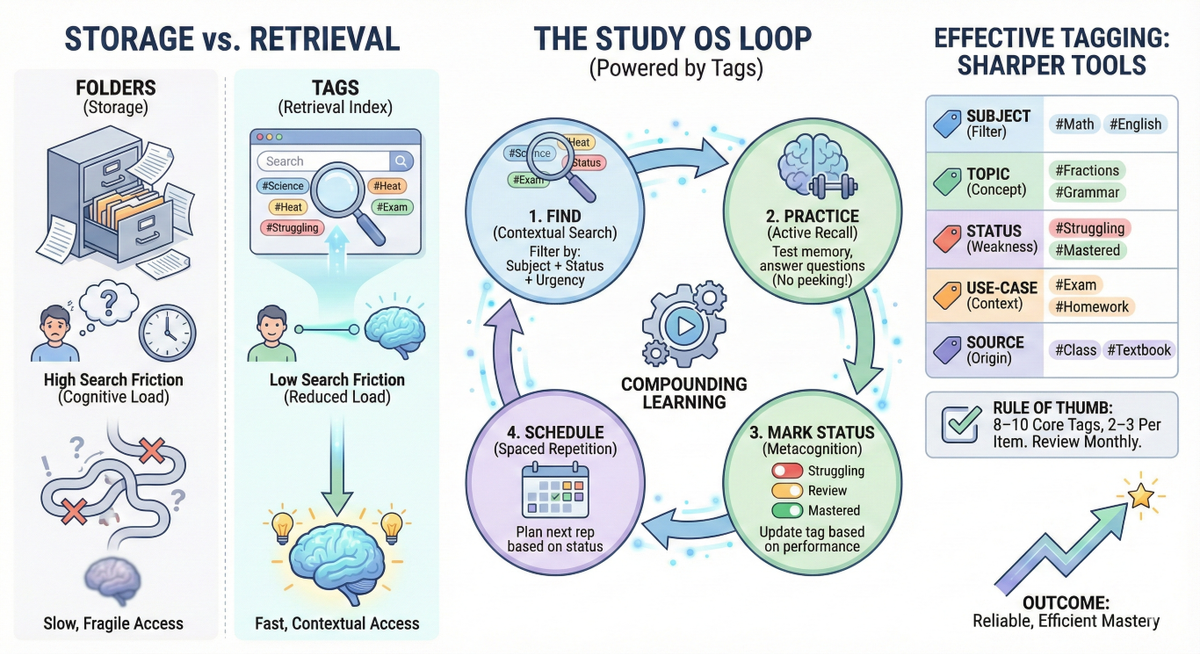
The Diagnosis: When Studying Fails, It's Often a Retrieval Problem
Most students don't struggle because they never wrote notes.
They struggle because when it's time to study, they can't find the right note, the right mistake, or the right example — fast enough to use it.
So, they do what any human does under time pressure:
- re-read whatever is easiest to locate,
- rely on recent memory ("I saw this yesterday, I must know it"),
- and then feel shocked in the test when the brain can't pull it up.
This is not laziness. It's missing infrastructure.
Named Pattern: The "Needle-in-the-Notebook" Loop
You know you wrote it down… somewhere.
You spend 12 minutes searching.
You settle for the wrong page.
You "study" by re-reading.
You feel busy, but nothing compounds.
Tagging breaks this loop by turning your learning into a searchable system.
Why Folders Don't Scale (And Your Brain Isn't a Filing Cabinet)
Folders force a single answer to a multi-question reality.
A single page about "Photosynthesis" might also be:
- an exam favorite,
- a hard concept,
- from today's class,
- and something you need to review this weekend.
Folders ask: "Where does this belong?"
Tags ask: "How might I need this later?"
That difference matters because learning is context-dependent. You don't only study by chapter — you study by weakness, by urgency, by upcoming tests, and by the kinds of mistakes you keep making.
The Science: Tagging Reduces Friction, Which Protects Attention
There are two costs when you study:
- the cost of thinking, which is good (that's learning), and
- the cost of managing information, which is often wasted effort.
Cognitive Load Theory suggests that reducing extraneous load (the mental effort spent on logistics) increases the attention available for learning tasks.
Tagging is a practical way to reduce that extraneous load:
- less time hunting,
- fewer context switches,
- faster start to the actual work (recall, practice, problems).
And because tags improve search and retrieval speed, they indirectly enable more frequent "small reps" — which is where compounding happens.
Tagging as a Study OS Feature: From Storage to Training
Think of your learning materials like a laptop.
- Notes are files
- Folders are storage
- Tags are the search index
- Active recall is the training program
- Spaced repetition is the schedule
Without an index, the best files still feel lost.
With tags, you can run a Study OS loop:
- Find what matters
- Practice it (recall/problems)
- Mark status
- Schedule the next rep
That is the "effort → system → outcome" chain in its simplest form.
What Good Tags Look Like: Fewer, Sharper, More Reusable
A high-quality tag set behaves like a small set of reliable tools — not a massive toolbox you never open.
A practical tag stack (8–10 to start)
| Tag Type | Examples | Why it matters |
|---|---|---|
| Subject | Math, Science, English | Fast filtering by course |
| Topic | Fractions, Heat, Grammar | Direct retrieval by concept |
| Status | Struggling, Review, Mastered | Metacognition: "where am I weak?" |
| Use-case | Exam, Homework, Project | Context: "why do I need this?" |
| Source | Class, Textbook, Video | Coverage check + revision variety |
Rule of thumb: 2–3 tags per item. Enough to find it later, not so many that tagging becomes homework.
A Concrete Tuesday Example (Grade + Subject + Time Box)
Grade 7 Science, Tuesday 6:45 PM (12 minutes)
Goal: turn "I have notes" into "I can retrieve answers."
- 2 min — Find your weak spot
Filter by tags: Science + Heat + Struggling
- 6 min — Active recall (no looking)
Answer 6 quick questions from memory:
- "What is conduction?"
- "Why does metal feel colder than wood?"
- "One real-life example of convection?"
(Write short answers.)
- 2 min — Tag the outcome
If you missed 2+ answers, keep Struggling.
If you got most right but it felt slow, tag Review.
- 2 min — Schedule the next rep
Add Review Tomorrow (or a date-based tag if you prefer).
Output: "6 retrieval questions answered + updated status tags + next review planned."
That is a tiny session with compounding effects.
"Avoid Tag Chaos": The One Failure Mode to Watch
Tagging fails when it becomes decoration.
If you create 47 tags in week one, your future self won't remember which to use — and you'll stop tagging entirely.
Guardrails that keep tagging sane
- Start with 8–10 core tags
- Use consistent spelling (pick
ExamnotExams+Test+Assessment) - Do a monthly cleanup: merge duplicates, delete unused tags
- Create new tags only when you repeatedly think: "I wish I could find this faster."
How EaseFactor Fits In (Without Making It About Features)
In EaseFactor, tagging is not a cosmetic label — it is part of the learning loop:
- Tags make it easier to pull the right material for active recall
- Status tags support metacognition ("errors are data, not identity")
- Tags help prioritize spaced repetition so review time goes to the right places
- Shared tags can create a common language for study groups and families
In other words: tagging is the infrastructure that helps other learning science methods actually run day-to-day.
Try This Today (10 minutes): Build Your "Tag Starter Kit"
Time: 10 minutes
Goal: create a small tagging system you can actually maintain.
- 2 min — Choose 3 subject tags
Example: Math, Science, English
- 3 min — Choose 3 status tags
Struggling, Review, Mastered
- 3 min — Choose 2 use-case tags
Exam, Homework
- 2 min — Tag 5 recent items
Each item gets:
- 1 subject tag
- 1 topic tag (create if needed)
- 1 status tag
Output: "5 items tagged with a consistent system."
That's enough to feel the retrieval benefit immediately.
A Calm Next Step
If studying often feels like "I worked hard, but it didn't show up on test day," don't chase perfect motivation. Improve retrieval infrastructure. Tagging is one of the smallest changes that makes a Study OS possible — because it helps effort turn into repeatable practice.
TL;DR
- Tagging is not "organization." It's retrieval infrastructure — it helps you find and practice the right thing faster.
- Good tags reduce "search stress" (extra mental load) and make spaced repetition + active recall easier to run.
- Start with 8–10 tags, use 2–3 per item, and review monthly to prevent tag chaos.
Citations
- Cognitive Load Theory (Sweller)
- Testing Effect / Retrieval Practice (Roediger & Karpicke)
- Tagging and information retrieval efficiency (information science literature)
- Collaborative tagging and shared meaning-making in learning environments

Manoj Ganapathi
Founder and Builder of EaseFactor. Passionate about evidence-based learning and helping students build effective study habits through cognitive science principles.
Ready to Study Smarter?
EaseFactor uses these learning science principles to help you build lasting knowledge.