SMART Goals to Actionable Tasks
 Manoj Ganapathi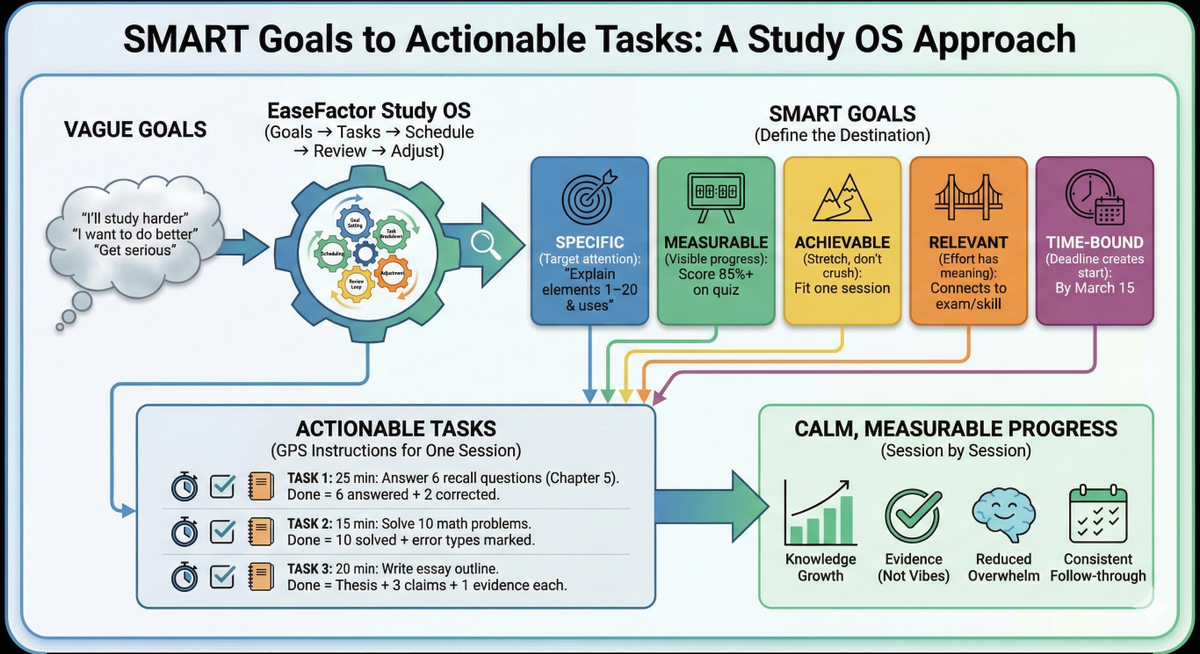
The friction no one warns students about: "I want to do better" isn't a plan
Most students don't struggle because they don't care. They struggle because their goals are too fuzzy to guide the next 20 minutes.
- "I want to ace math."
- "I'll study more."
- "I should get serious."
Those are intentions - not instructions. And when your brain doesn't know what to do next, it defaults to what feels safest: re-reading notes, watching another video, or postponing.
Here's the shift EaseFactor is built around:
Effort → System → Outcome
Effort without a system leaks. Effort with a system compounds.
Diagnosis: symptoms vs infrastructure
Symptoms students feel
- "I study a lot but forget."
- "I don't know where to start."
- "I plan… then I don't follow it."
What's usually missing (infrastructure)
- Clear targets (SMART goals)
- Small "finishable" tasks (task decomposition)
- A rhythm (schedule + reviews)
- Feedback loops (progress tracking + weekly reset)
Tutoring, notes, and extra hours can help - but they work best when paired with a Study OS that translates learning into repeatable actions.
A named pattern you'll recognize: The Sunday Plan Mirage
Sunday Plan Mirage: You make a beautiful plan on Sunday… and by Tuesday it collapses because nothing is specific enough to execute under real school pressure.
SMART goals + actionable tasks fix that - because they turn planning into something your Monday brain can actually follow.
Why SMART goals work
SMART stands for Specific, Measurable, Achievable, Relevant, Time-bound. It's not a motivational poster. It's a way to give your brain clear cues, clear feedback, and clear urgency.
Specific = attention has a target
"Improve science" is fog. "Explain elements 1–20 and their uses" is a target.
When attention has a target, it's easier to ignore distractions because you know what "on-task" looks like.
Measurable = progress becomes visible
Measurable goals give you feedback like a scoreboard. Without measurement, students fall into the illusion of fluency (it feels familiar, so they assume they know it).
Achievable = challenge without shutdown
Goals should stretch, not crush. If a goal is impossible, students don't just fail - they often conclude, "I'm not that kind of person."
Relevant = effort has meaning
Relevance connects work to a purpose (an exam, a skill, confidence, a future subject). It's the difference between pushing a boulder and training for a match.
Time-bound = procrastination loses its hiding place
A deadline creates a "start line." Without it, the brain keeps negotiating: "later."
The real bridge: turning goals into one-session tasks
A SMART goal is your destination. Actionable tasks are your GPS instructions.
If the task is still too big, your brain experiences it like a heavy file that won't open - and you avoid it.
Rule of thumb: a task should be "finishable"
A good task answers:
- What am I doing?
- How long will it take?
- What does DONE mean?
Bad task: "Study Chapter 5"
Good task: "25 minutes: answer 6 recall questions from Chapter 5 without notes; mark 2 weak areas."
This is cognitive load management in practice: smaller tasks reduce overwhelm, increase follow-through, and create momentum.
The Goal-to-Task Pipeline inside a Study OS
Here's the system EaseFactor is designed to make easy:
- Set one SMART goal
- Reverse engineer the requirements (topics, skills, question types)
- Create milestones (by chapter / concept / skill)
- Decompose milestones into one-session tasks
- Schedule tasks + built-in review
- Track progress + adjust weekly
Think of it like software:
- SMART goal = product spec
- Tasks = tickets
- Schedule = sprint plan
- Reviews = regression testing
- Reflection = retrospectives
Concrete Tuesday example: what this looks like in real life
Grade 7 Science (Periodic Table), Tuesday 6:10–6:22 PM (12 minutes)
SMART Goal (2 weeks)
Score 85%+ on the periodic table quiz on March 15 by mastering elements 1–20 (names, symbols, and 1 real-world use each).
Today's task (12 minutes)
- 5 min Active Recall: Write symbols for elements 1–10 from memory.
Output: a sheet with 10 attempts.
- 4 min Check: Circle misses; look up correct answers.
Output: 3 missed symbols rewritten correctly.
- 3 min "Confusion List": Write 2 questions you still have (e.g., "Why do some symbols not match English names?").
Output: 2-item confusion list.
That's a Study OS session: short, specific, measurable, and it produces evidence - not vibes.
Task granularity: the sweet spot that avoids busywork
If tasks are too big → avoidance. If tasks are too tiny → "I did a lot" but didn't learn much.
A practical guide:
- Recall tasks: 10–25 minutes (flashcards, retrieval questions)
- Application tasks: 25–45 minutes (problem sets, worked examples)
- Creation tasks: 45–90 minutes (essay outline, lab report draft)
Done rule: If you can't tell whether you finished, it wasn't a task - it was a wish.
Try this today (10–12 minutes): One SMART Goal → Three Tickets
Goal: Convert one vague goal into a SMART goal + three finishable tasks.
Step 1 (2 minutes): Write the SMART goal
Use this template:
"I will ___ (specific skill) to ___ (measurable score/result) by ___ (date) because ___ (relevance)."
Step 2 (6 minutes): Create 3 one-session tasks ("tickets")
Each ticket must include:
- time box
- action
- done rule
Examples:
- "15 min: answer 6 retrieval questions; done = 6 answered + 2 corrected"
- "25 min: solve 10 problems; done = 10 solved + mark error types"
- "20 min: write essay outline; done = thesis + 3 claims + 1 evidence each"
Step 3 (2–4 minutes): Schedule the first ticket
Pick a specific time slot within the next 24 hours.
Output by the end:
- 1 SMART goal written
- 3 tickets written
- 1 ticket scheduled
Common pitfalls (and the quick fixes)
Too many goals: 6 goals, zero momentum → Cap at 2–3 priorities per term
"Study" tasks: "Study chapter" repeats forever → Convert into retrieval + done rule
No review loop: Learning fades after day 2 → Schedule short spaced reviews (next day, next week)
Perfectionism: One missed day = "I failed" → Treat plans as hypotheses; adjust weekly
Where EaseFactor fits
EaseFactor's promise is not "work less." It's waste less effort - by giving students the Study OS layer: goals that translate into tickets, tickets that land on a schedule, and progress that stays visible to families without hovering.
If you want, treat this post as your starting point: build one SMART goal, generate three tickets, and run the 10–12 minute routine for a week. Consistency beats intensity - because it compounds.
TL;DR
- Vague goals create overwhelm; SMART goals create direction and feedback.
- Big goals become doable when you convert them into one-session tasks with clear "done" rules.
- Your Study OS is the missing layer: goals → tasks → schedule → review → adjust.
Citations
- Goal-setting theory (Locke & Latham)
- Feedback and formative assessment (Hattie & Timperley)
- Working memory limits (Cowan)
- Cognitive Load Theory (Sweller)
- Implementation intentions (Gollwitzer)
- Self-efficacy and motivation (Bandura; Ryan & Deci)
- Spacing effect / distributed practice (Cepeda et al.)
- Fresh start effect / temporal landmarks (Dai, Milkman)

Manoj Ganapathi
Founder and Builder of EaseFactor. Passionate about evidence-based learning and helping students build effective study habits through cognitive science principles.
Ready to Study Smarter?
EaseFactor uses these learning science principles to help you build lasting knowledge.