Keyboard or Pencil? The Science of When to Type and When to Write
 Manoj Ganapathi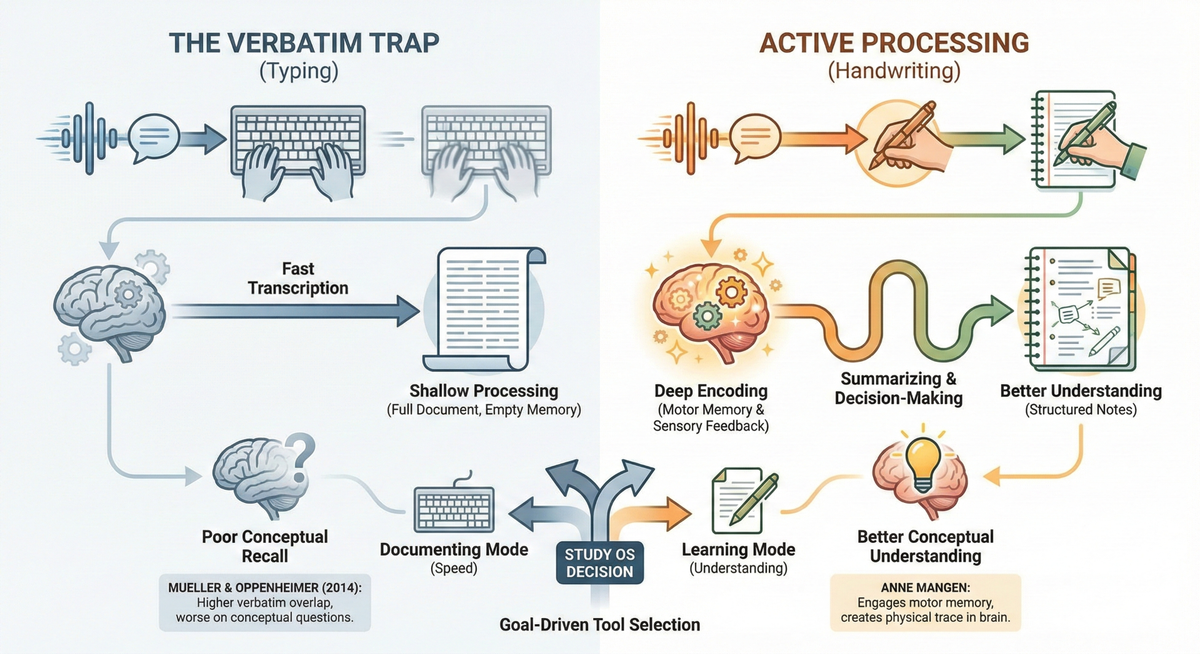
You finished taking notes in class. Your fingers flew across the keyboard. You have three pages of detailed text. But when you close your laptop... nothing stuck.
Here's a question most students never think to ask: Does how you capture information affect how well you learn it?
The answer, according to research, is yes — dramatically.
Laptops feel efficient. You can type faster, capture more words, and your notes look clean. But Mueller and Oppenheimer's landmark 2014 study revealed an uncomfortable truth: students who took notes on laptops performed worse on conceptual questions than students who wrote by hand. Even when distractions were eliminated. Even when students had more notes to study from.
The problem wasn't the technology itself. It was what the technology encouraged: word-for-word transcription instead of thinking.
The named pattern: The Verbatim Trap
The Verbatim Trap: When you type notes word-for-word, capturing everything the teacher says but processing none of it — leaving your brain with a full document and an empty memory.
Here's what's happening:
- The teacher speaks.
- Your fingers type the words — almost automatically.
- The information flows from ears to fingers, bypassing your thinking brain.
- Your notes are complete. Your understanding is not.
- Later, you re-read notes that feel unfamiliar, as if someone else wrote them.
The Verbatim Trap feels productive. You have "everything." But you've traded quantity for quality — and your memory pays the price.
Quick diagnosis: symptoms vs infrastructure
Common Verbatim Trap symptoms:
- Notes are nearly word-for-word transcripts of lectures
- Re-reading notes feels like learning new material
- You remember having the information but can't recall it
- More notes don't lead to better test performance
- Studying feels like starting from scratch
What's actually missing (infrastructure):
- Active processing during note-taking (not just recording)
- Decision-making moments (what's important? how does this connect?)
- Motor engagement (the encoding benefits of handwriting)
- A system for choosing tools based on learning goals, not convenience
Faster note-taking won't fix the Verbatim Trap. Smarter note-taking will.
The science: why handwriting helps your brain (and when typing still wins)
The laptop note-taking study (Mueller & Oppenheimer, 2014)
Pam Mueller and Daniel Oppenheimer ran a simple experiment: students watched lectures and took notes either by hand or on laptops (with internet disabled). Then they were tested.
Results:
| Note-Taking Method | Factual Questions | Conceptual Questions |
|---|---|---|
| Handwriting | Similar performance | Better performance |
| Laptop typing | Similar performance | Worse performance |
The difference appeared on conceptual questions — the ones that require understanding, not just recognition.
Why? The researchers measured "verbatim overlap" between student notes and lecture transcripts:
- Handwriting notes: 8.8% verbatim overlap
- Laptop notes: 14.6% verbatim overlap
Laptop users were transcribing. Handwriters were summarizing.
Key insight: The constraint of handwriting (you can't write as fast as someone speaks) forces your brain to make decisions: What's the main idea? How can I say this shorter? What's the connection? Those decisions ARE the learning.
The encoding effect (Anne Mangen)
Handwriting doesn't just slow you down — it engages your brain differently.
Anne Mangen's research on "haptic perception" shows that handwriting involves:
- Motor memory: Your brain remembers the shape of each letter you form
- Sensory feedback: You feel the pen on paper, creating multi-sensory encoding
- Spatial processing: Letters and ideas are placed in physical space on the page
Typing, by contrast, relies on a single repeated motion (pressing keys) that's the same for every letter. Your brain doesn't encode the shape of ideas — just the location of buttons.
Mangen's studies using brain imaging (fMRI) found that people who learned new alphabet letters by handwriting showed activation in Broca's area (linked to language processing). Those who learned by typing? Little to no activation.
In plain terms: Handwriting leaves a physical trace in your brain. Typing... often doesn't.
But typing isn't always wrong
Before you throw away your laptop, here's the nuance:
| Task | Best Tool | Why |
|---|---|---|
| Learning concepts | Handwriting | Forces processing, creates motor memory |
| Capturing lengthy quotations | Typing | Speed matters when accuracy is key |
| Taking notes to study later | Handwriting | Deeper encoding means better recall |
| Recording information to reference | Typing | Searchable, easy to organize |
| Brainstorming connections | Handwriting | Spatial freedom, sketching allowed |
| Collaborative documents | Typing | Easy sharing and editing |
The question isn't "which is better?" It's "what's my goal right now?"
The Study OS approach: choosing tools strategically
EaseFactor treats tool selection as a learning decision — not a convenience decision. Here's how a Study OS breaks the Verbatim Trap:
1) Ask: "Am I learning or documenting?"
- Learning mode: Use handwriting. The goal is understanding.
- Documenting mode: Typing is fine. The goal is accurate records.
Most school situations are learning mode. Act accordingly.
2) Use the "summarize-first" rule
Even when typing, force yourself to summarize before (or instead of) transcribing:
- Listen for 30 seconds before typing anything
- Write the main idea in ONE sentence
- Add supporting details only if they clarify the main idea
This replicates the cognitive constraint that handwriting provides naturally.
3) Hybrid approach: Cornell digital-analog method
For longer lectures:
- During class: Handwrite main ideas and questions in Cornell format
- After class: Type a clean summary, filling in gaps from memory first
- Review: Use the handwritten notes — not the typed version
This gives you the encoding benefits of handwriting AND the organization benefits of typing.
4) Match tool to content type
- Conceptual content (understanding, connections): Handwrite
- Procedural content (steps, processes): Either — but add your own labels
- Factual content (names, dates, definitions): Either — but quiz yourself immediately
5) Build "processing pauses" into typed notes
If you must type during class:
- Every 5 minutes, stop typing
- Close your eyes and summarize what you just heard (no looking at notes)
- Add a one-sentence summary to your notes
This interrupts the Verbatim Trap loop.
A concrete Tuesday example (what this looks like in real life)
Grade 8 Science (Cell Structure), Tuesday 10:15–10:27 am (12 minutes)
Goal: Take notes that actually encode into memory.
- Before class (2 minutes) — Tool decision
- Content: Conceptual (understanding cell parts and functions)
- Mode: Learning (need to understand, not just record)
- Decision: Handwriting + Cornell format
- Output: Paper ready with Cornell layout (cue column + notes column)
- During class (6 minutes) — Active handwriting
- Write main ideas only (not word-for-word)
- Leave space between ideas
- Draw a quick sketch of the cell (spatial encoding)
- When you miss something, write a "?" instead of panicking
- Output: 1 page of summarized notes + 1 sketch
- After class (2 minutes) — Fill and connect
- Without looking at the textbook, fill in gaps from memory
- Add one question to the cue column: "What's the difference between cell wall and cell membrane?"
- Output: Notes enhanced with self-generated connections
- Later that day (2 minutes) — Test yourself
- Cover the notes column
- Try to answer your cue column question from memory
- Output: 1 retrieval attempt (strengthens memory)
Total output: 1 page of processed notes + 1 sketch + 1 self-generated question + 1 retrieval practice.
That's not just note-taking. That's learning infrastructure.
Try this today (10 minutes): The Write-to-Think Protocol
Use this routine when you need to learn (not just record) information.
Total time: 10 minutes
Output: 1 tool decision + 5 summarized ideas + 1 connection sentence + 1 retrieval check
- 1 minute — Make the tool decision
- Ask: "Am I trying to understand this or just save it?"
- If understanding: Get paper and pen
- If saving: Typing is fine, but use the summarize-first rule
- Output: Right tool selected for the job
- 5 minutes — Summarize, don't transcribe
- Read/listen to your source material
- After every key point, pause and write ONE sentence summary—in your own words
- No copying allowed. Rephrase everything.
- Output: 5 summarized ideas (handwritten if learning)
- 2 minutes — Make one connection
- Write: "This connects to ____ because ____"
- Link to something you already know
- If you can't think of a connection, write: "I wonder how this relates to ____?"
- Output: 1 connection sentence
- 2 minutes — Retrieval check
- Turn your notes over or close your eyes
- Recite the 3 most important points aloud
- Check: Did you remember them? Mark any gaps.
- Output: Gaps identified for later review
De-shaming reframe:
If you've been typing everything word-for-word, you weren't being lazy — you were being efficient. The problem is that efficiency at capturing isn't the same as efficiency at learning. The goal isn't more notes. It's more understanding per note.
For parents: how to support smarter note-taking
Do:
- Ask: "Can you explain what you learned today?" (encourages processing)
- Praise summarizing: "You captured the main idea in one sentence — that's a skill."
- Provide good handwriting tools (pen quality actually affects willingness to write)
- Encourage sketching and diagrams as part of notes
Avoid:
- "Just type it, it's faster" (faster isn't better for learning)
- Judging messy handwritten notes (process matters more than appearance)
- Assuming more notes = more learning
- Letting notes become "write and forget" documents
Reframe to try:
"Your brain remembers what it works on. Handwriting makes your brain work more than typing does."
When to use each tool: the quick reference
| Situation | Recommended Tool | Why |
|---|---|---|
| Learning new concepts | Handwrite | Forces processing, motor memory |
| Studying for a test | Handwrite (active recall) | Encoding + retrieval benefits |
| Recording a lecture to review later | Type (with summaries) | Speed + searchability |
| Brainstorming essay ideas | Handwrite | Spatial freedom, connections |
| Taking notes from a textbook | Handwrite | Slows you down to process |
| Collaborating on a project | Type (shared doc) | Practical collaboration |
| Copying exact quotes | Type | Accuracy matters |
| Creating flashcards | Either (test yourself) | The testing matters more than the medium |
Calm Next Steps: make every note count
The Verbatim Trap makes you feel productive while learning less. The fix isn't to work harder — it's to work with your brain's encoding systems.
A Study OS helps by:
- Prompting you to choose the right tool before you start
- Providing Cornell templates for structured handwriting
- Building retrieval practice into every study session
- Tracking what you're actually learning (not just what you've written)
EaseFactor turns note-taking from mindless transcription into active understanding — one processed idea at a time.
Citations
- Mueller, P. A. & Oppenheimer, D. M. (2014): "The Pen Is Mightier Than the Keyboard"—laptop vs. longhand note-taking effects on learning
- Mangen, A. & Velay, J.-L. (2010): Handwriting and haptic perception research
- Mangen, A., Anda, L. G., Oxborough, G. H., & Bronnick, K. (2015): Handwriting versus keyboard writing effect on word recall
- Van der Meer, A. L. H. & Van der Weel, F. R. (2023): Handwriting vs. typewriting and brain connectivity (high-density EEG study)
- Wammes, J. D., Meade, M. E., & Fernandes, M. A. (2016): Drawing and memory trace components
- Morehead, K., Dunlosky, J., & Rawson, K. A. (2019): Replication attempts of Mueller & Oppenheimer
- Shibata, H. & Omura, K. (2018): Reconsideration of the effects of handwriting on reading/memory
TL;DR
- The Verbatim Trap: Typing makes it easy to transcribe lectures word-for-word — capturing everything while processing nothing.
- Handwriting forces your brain to summarize, creating deeper encoding through motor memory and active decision-making.
- A Study OS helps you choose the right tool for each task: handwrite for learning, type for documenting — and always process before moving on.
- Try today: the Write-to-Think Protocol — a 10-minute system for choosing the right tool and processing information actively.

Manoj Ganapathi
Founder and Builder of EaseFactor. Passionate about evidence-based learning and helping students build effective study habits through cognitive science principles.
Ready to Study Smarter?
EaseFactor uses these learning science principles to help you build lasting knowledge.