The Cornell Notes Method, Rebuilt as a Study OS
 Manoj Ganapathi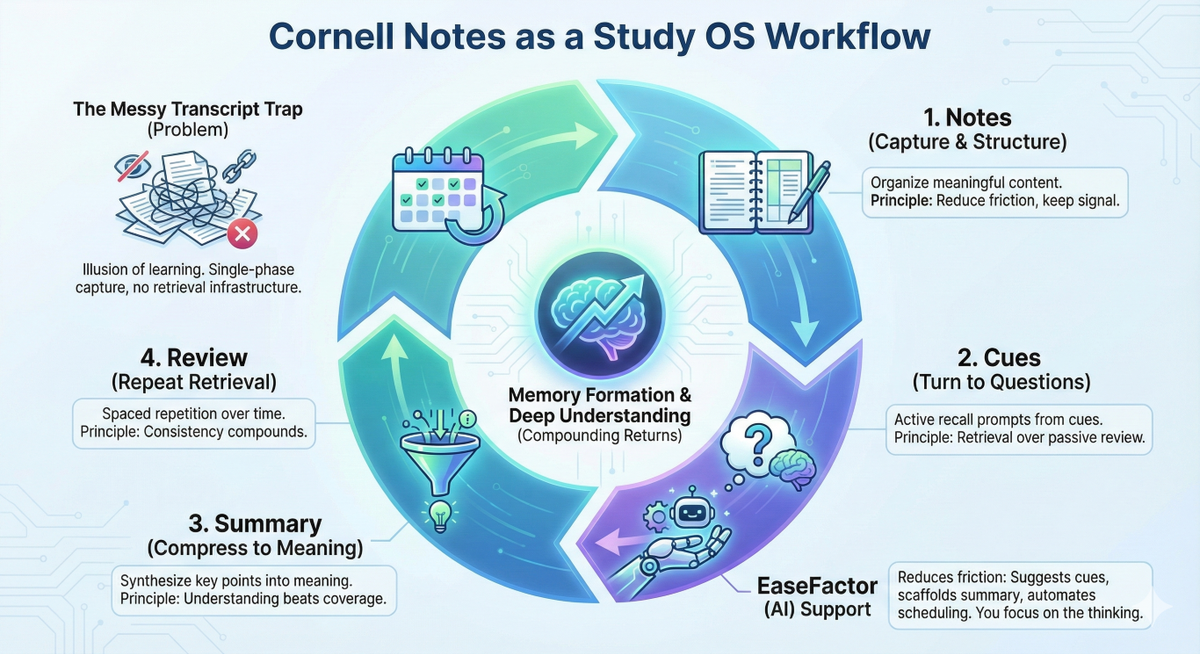
The Messy Transcript Trap: when notes look complete, feel productive, and still don't help during homework or tests.
It happens because writing everything down can create an illusion of learning. You recognize the page, but you can't retrieve the idea without it. That's the gap between "I took notes" and "I can use this."
Diagnosis: symptoms vs infrastructure
Symptoms you see
- "I studied for hours but blanked out."
- "I understand in class, forget at home."
- "I reread notes and it feels familiar… until the test."
Infrastructure you're missing
- A system that repeatedly asks: Can I recall this? Can I explain it? Can I connect it?
Cornell Notes are powerful because they quietly install that infrastructure - if you use all three sections on purpose.
The insight: Cornell Notes aren't a format. They're a workflow.
Most note-taking is a single-phase activity: capture information.
Cornell Notes are a multi-phase learning loop:
- Notes (capture and structure)
- Cues (turn notes into questions)
- Summary (compress into meaning)
- Review (use cues for active recall over time)
That's why they tend to outperform "pretty notes." They convert study time into memory formation work.
The science, translated into plain language
1) Cognitive load: reduce decision fatigue while learning
Working memory is limited. When a student listens, writes, organizes, and decides what matters - all at once - performance drops. A predictable Cornell layout reduces the mental overhead of "Where do I put this?" so the brain can spend more energy on "What does this mean?"
Analogy: It's like having labeled drawers in a toolkit. You don't become a better mechanic because drawers exist, but you waste far less effort searching - so you can focus on the repair.
2) Retrieval practice: memory strengthens when you pull it out, not when you look at it
The cue column is built for self-testing: cover the notes, read a cue, answer from memory, then check. This repeated retrieval is one of the most reliable ways to improve long-term retention.
Key point: Reviewing isn't the same as remembering. Remembering is the exercise.
3) Metacognition: the system trains "knowing what you know"
When students write cues ("What would a test ask here?") and a summary ("What's the point?"), they practice monitoring their understanding. That helps them study smarter next time - because they learn to spot gaps early.
De-shaming reframe: Errors are data, not identity.
Next action (5–10 minutes): Circle the cue you missed, add one clarifying line to the notes, and schedule a 2-minute re-try tomorrow.
Cornell Notes as a mini Study OS (the EaseFactor way)
A Study OS isn't more effort. It's effort with compounding returns.
Think of each Cornell page as a "lesson unit" in your learning operating system.
The Cornell → Study OS mapping
Notes (right) — Capture + organize meaningfully → Reduce friction, keep signal
Cues (left) — Convert content into questions → Active recall over passive review
Summary (bottom) — Synthesize + compress → Understanding beats coverage
Review cadence — Repeat retrieval over time → Consistency compounds
What this looks like on a Tuesday
Grade 7 Science (Photosynthesis), 12 minutes after school
Goal: Turn today's lesson into something you can recall Friday without re-reading.
1) 2 minutes - Notes quick clean-up
Underline 3 keywords (e.g., chlorophyll, glucose, carbon dioxide). Add one arrow showing the flow: light → chemical energy.
2) 5 minutes - Cues (write 6 retrieval questions)
Examples:
- "What is the job of chlorophyll?"
- "Write the photosynthesis equation from memory."
- "What would happen if a plant had no light for 3 days?"
- "What are inputs vs outputs?"
- "Explain photosynthesis in one sentence."
- "How is this related to respiration?"
3) 3 minutes - Summary (3 sentences max)
Sentence 1: What it is. Sentence 2: Inputs/outputs. Sentence 3: Why it matters (energy + ecosystems).
4) 2 minutes - Schedule
Review tomorrow (2 minutes), then in 4 days (4 minutes). Use only the cue column to test.
Output at the end: 6 answered questions + 1 tight summary + 2 reviews scheduled.
That's "progress every session" - not busywork.
Where students usually fail (and how to fix it fast)
Failure mode A: Cues that are too weak
Bad cue: "Photosynthesis"
Better cue: "Write the equation and label inputs/outputs."
Rule: Cues must be answerable without looking and specific enough to grade yourself.
Failure mode B: Summaries that are too long
If the summary becomes a second set of notes, it stops doing its job.
Rule: Keep it 3–5 sentences max, in your own words, with one connection ("This links to…").
Failure mode C: No review loop
Cornell without review is like exercise without repetition: you feel busy, but you don't adapt.
Rule: Two short reviews beat one long reread.
Where AI helps (without replacing effort)
Cornell Notes are effective, but many students abandon them because the "after class" step feels like extra work. This is exactly where AI should help: reduce friction, not reduce thinking.
AI can do the high-friction parts
- Suggest high-quality cue questions aligned to the notes
- Detect missing definitions or "thin" explanations
- Propose a tight summary scaffold (you still write the final version)
- Turn cues into spaced repetition prompts with adaptive timing
You still do the learning-critical parts
- Answering cues from memory
- Fixing misunderstandings
- Explaining in your own words
- Showing up consistently
EaseFactor promise: AI handles the formatting and prompting so students invest effort where it pays interest - retrieval, clarity, and repetition.
Try this today (10 minutes, strict)
The 10-Minute Cornell Upgrade
Minute 0–2: Select
Pick one page of notes from today (or yesterday).
Minute 2–6: Generate (6 cues)
Write 6 questions in the cue column:
- 2 definition/term questions
- 2 "explain in your own words" questions
- 2 application questions ("What if…?", "Why does…?")
Minute 6–9: Summarize
Write a 3-sentence summary:
- What it is
- How it works
- Why it matters
Minute 9–10: Schedule
Set two micro-reviews:
- Tomorrow: 2 minutes (answer cues only)
- In 4–7 days: 4 minutes (answer cues + revisit misses)
Reflection prompt (30 seconds): What cue question was hardest - and what does that tell you to fix first?
TL;DR
- Cornell Notes work when they force retrieval, synthesis, and self-checking - not when they become neat transcription.
- Treat Cornell as a mini Study OS per lesson: capture → question → summarize → schedule reviews.
- EaseFactor can reduce friction (better questions, smarter reviews) so effort goes into understanding, not formatting.
Citations
- Cognitive Load Theory (John Sweller)
- Dual Coding Theory (Allan Paivio)
- Metacognition / monitoring and control (John Flavell)
- Retrieval practice / test-enhanced learning (Roediger & Karpicke)
- Note-taking and generative processing (Mueller & Oppenheimer; Kiewra et al.)
- Effective learning techniques review (Dunlosky et al., 2013)

Manoj Ganapathi
Founder and Builder of EaseFactor. Passionate about evidence-based learning and helping students build effective study habits through cognitive science principles.
Ready to Study Smarter?
EaseFactor uses these learning science principles to help you build lasting knowledge.